How I Built a Powerful AI Coding Setup on a Budget
11-05-2026
Recently, I built an open-source testing tool called Evaliphy.
I built it for almost zero cost. No subscription to Cursor. No CoPilot access. No expensive IDE at all. Just $30 worth of OpenRouter credits.
To be clear, Evaliphy isn't a proof-of-concept project. It's a full end-to-end testing framework for AI systems, the equivalent of what Playwright does for UI testing. The codebase is 25k lines as of now.
So how did $30 cover 25k lines of code?
Before I explain my setup, you need to understand how token economics work in agentic coding.
Token Economy for Agentic Coding
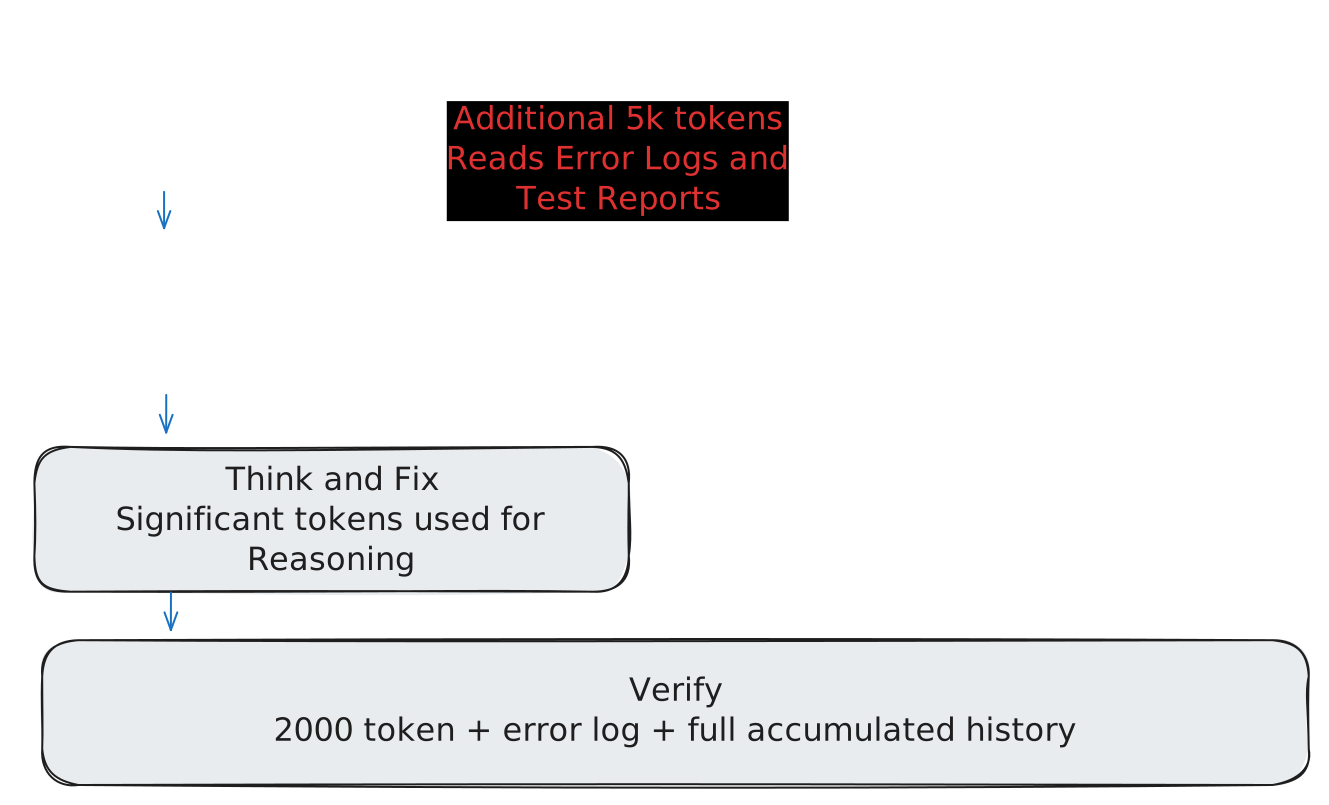
LLM output tokens cost more than input tokens. For example, when you ask "tell me about Paris," you feed in only a few tokens but the LLM produces a full page of details, which carries a cost. But with agentic coding, the expensive part isn't output, it's input.
Generally, output tokens cost 3x to 5x more than input tokens. But when you're doing agentic work, input tokens become 150 times more expensive than output tokens in terms of overall budget impact.
I won't dive deep into how agentic IDEs like Cursor, RooCode, or KiloCode work internally, but here's the simple version: when you ask an agent to write code, it loops like this:
writes code → runs tests → investigates failures → rewrites code → loop continues.
Additionally, there's often a verification agent checking the work of the code-writing agent. So each sub-agent needs full context. And context is costly.
No doubt, Cursor and other IDEs have optimized this using techniques like prompt caching and efficient embedding models. But the fundamental issue remains: input tokens are what eat up your costs, not output.
So if you're on a budget, your focus should be on saving input tokens, not output.
Model Selection
There are plenty of large language models available, each with their own tradeoffs. Since I was on a budget, I started from the bottom and worked my way up.
The first model I tried was qwen/qwen3-coder:free. I ditched it in minutes. Response time on my local setup was brutal.
Then I tried models like Codex 5 and Claude Sonnet 4.6. But I abandoned them after my first query to each. A single prompt to either of them ate through 1 dollar of my monthly budget.
That's when I moved to google/gemini-3-flash-preview. Its input tokens cost $0.50/M and output is $3/M. It was purely hit and trial approach to find a cost-effective model as prior to this experiment, I was just using what ChatGPT free tier offered. I had no previous experience of using a specific LLM for coding purpose.
However, I was clear on how to save cost.
As I mentioned earlier, input is what destroys your budget. So this made sense, I'd get a capable model without the input token bleed that Claude and Codex have.
LLMs as Implementation, Not Design
I knew that precise instructions matter with LLMs. But with coding, it's hard to be precise in a single prompt.
What I did instead was leverage the free tiers of ChatGPT and Claude in the browser. I didn't write code there. I used them to design the architecture.
For example, I didn't know how to build a DSL like below in TypeScript.
evaluate("this is my first test", () => {
  expect("something").isEqualTo("someOtherThing")
});
So I went to Claude and asked: how does Playwright provide its DSL? How does it run through the CLI?
I kept asking follow-ups until I understood the pattern. I used the Socratic method - questions, clarifications, more questions. During this journey, I exhausted the free tier multiple times, but I took a pause and came back, understood everything with free tier.
Once I had the architecture clear, I asked Claude for a .mdx file that describes, at a high level, how to build such DSL. I explicityly asked Claude to describe it in a way that junior engineers can implement it.
Then I took that `.mdx` file and fed it into my coding agent with one instruction: "Implement as described in the `.mdx` file and write unit tests for everything."
The .mdx file was comprehensive but not massive, it doesn't burn thousands of tokens. It containts decent architectural details for the feature I am building. And, honestly, it took only a few minutes to review the .mdx file, and correcting the things which I did not like.
In every attempt, the agent outcome was impressive and aligned with what I was thinking.
I'm still the architect. The LLM is the typist. I'm in control. I know what changed and why.
Cutting Input Tokens with Smart Context
There are many MCP servers, plugins, and skills that reduce input tokens by being selective about context. I used an open-source MCP server called context-mode with KiloCode in my VSCode.
context-mode squeezes the context by refining the way agent does a few things. For example, it uses code-based approach to find a piece of code across hundreds of file. It has a script to replace various tool calls. This helps reducing the input token cost significantly.
Benchmarks from context-mode.
Disabling Agent Freedom
I used open-source tools and OpenRouter, so I had full control over my setup. The first thing I did was strip away agent autonomy.
I disabled auto-mode for everything. This meant my agent could only read and write code files. It couldn't run commands on its own. It had to ask me first. This served two purposes: I stayed in control, and I prevented agents from running the same command repeatedly.
Here's why that matters for tokens: when an agent runs tests and ten fail with the same error, it reads the entire stack trace. That's thousands of tokens burned to understand one problem. My way was different. I ran tests myself. If they failed, I copied a few meaningful lines from the error and pasted them to the agent. That's all it needed to fix the issue.
I also disabled browser interaction for agents. That's a token sink.
The last thing I did was provide a brief project description as a KiloCode skill. I never spent much time expanding those skills as my costs were already so low that it didn't seem worth optimizing further.
One Problem at a Time
I never asked an agent to do multiple things in a single prompt. One task. One command.
For example, when I wanted to build the console report for Evaliphy, I didn't ask the agent to "build reporting." I broke it down. I told it: emit events, and emit them correctly as described in the .mdx file. That's it.
Why?
Because I already knew the architecture. Events done right meant reporting could come later, any kind of reporting. CSV, JSON, whatever. The foundation was designed to be flexible. The agent didn't need to decide anything. It just needed to implement what I had already thought through.
This is the key difference:
I was the architect. The agent was the typist.
Tool Set
- OpenRouter — AI gateway
- gemini-3-flash-preview - LLM
- KiloCode — coding agent
- context-mode — context optimization
- Free tier of ChatGPT and Claude — architecture design
- VSCode — editor